Texting with Ada
Text Ada
Optional text conversations about your website. Ada is our assistant — she uses AI.
How customers opt in
- Sign in to your existing account, then open Text Ada.
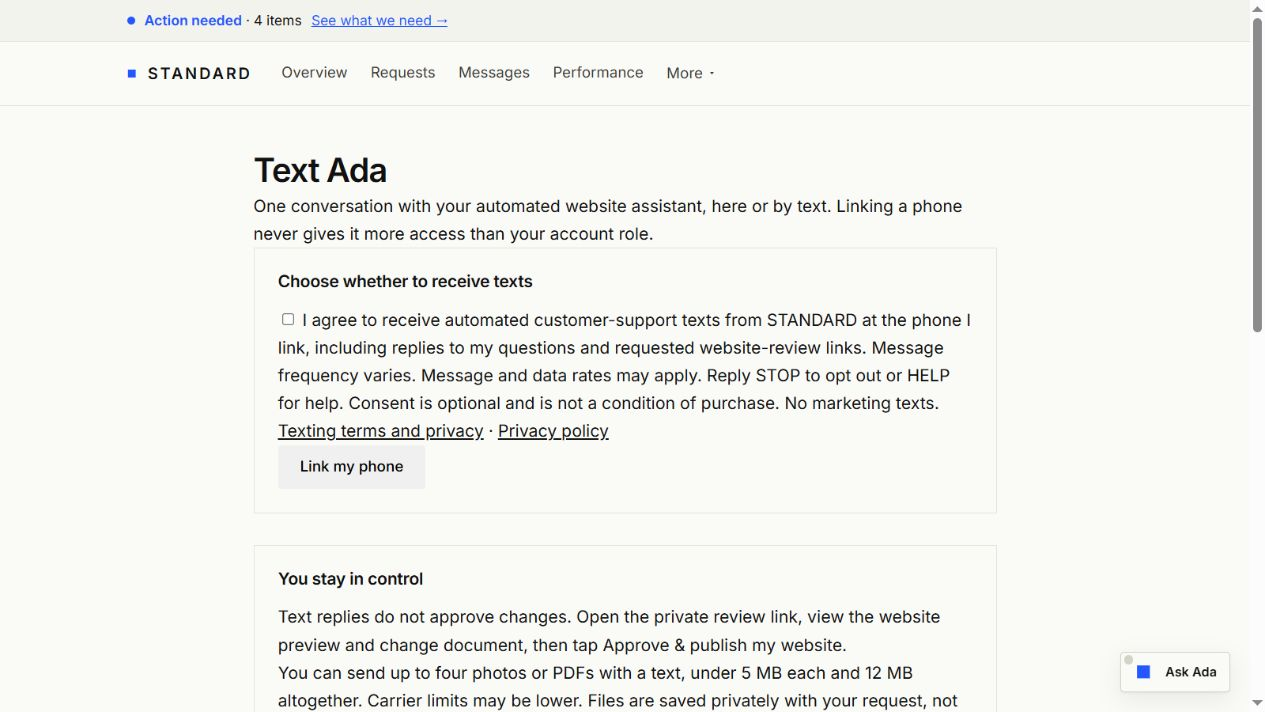
- In your account, choose the unchecked consent box and select Link my phone. Consent is optional and not required to buy or use our service.
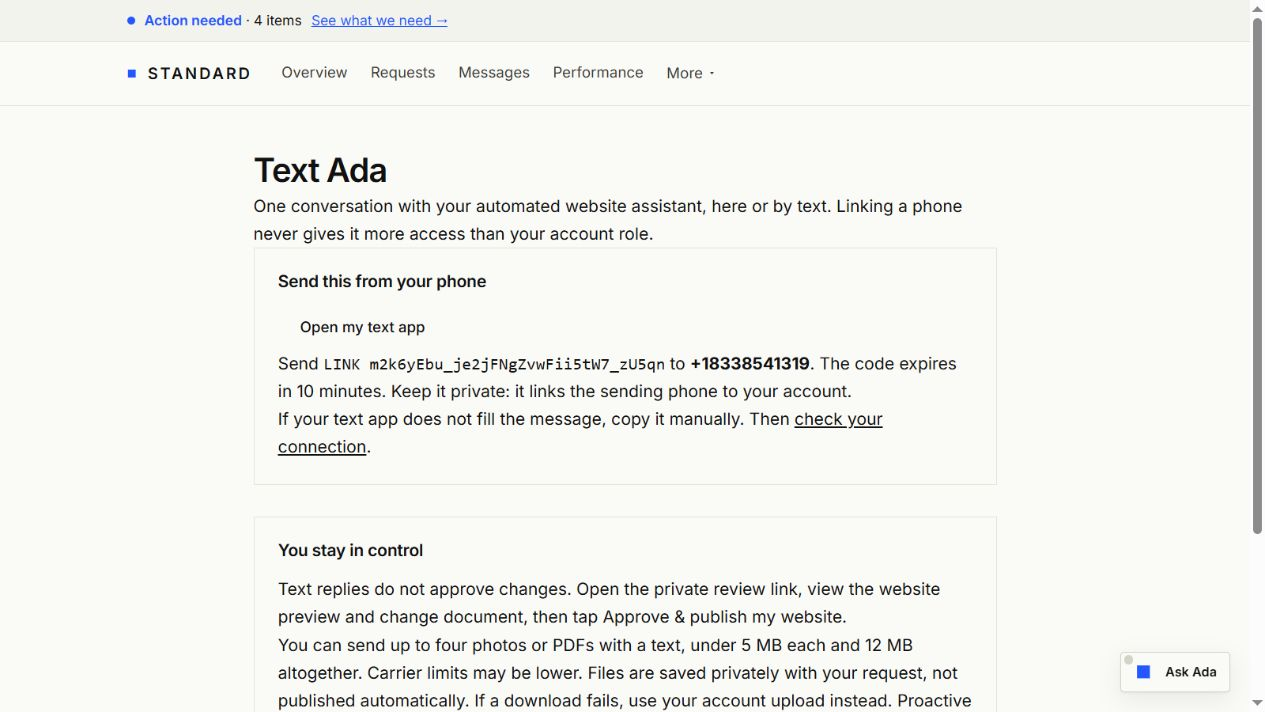
- Send the generated LINK message from the phone you want to use. The private code expires in 10 minutes. No account information is disclosed until your sending phone is linked.
- Receive a confirmation text. You can then ask questions and request website changes. Re-link after 90 days to confirm you still control the phone.
The consent shown in the account
The account opt-in screens
These screenshots show the actual account screens using an example account in an isolated test environment. The form starts unchecked. After choosing consent and selecting Link my phone, the customer receives instructions to send a private, one-time LINK message to our texting number, +18338541319. The example code shown below has been revoked and cannot link an account.
What we send
Replies to your business and website-support questions, requested private review links, and individual reminders you explicitly request and confirm. Message frequency varies with your requests. Message and data rates may apply. No cold outreach or bulk marketing is included. Carrier delivery is not guaranteed.
A text reply cannot authorize publishing. You must open the preview, view the change document, and tap Approve & publish my website on the website. You may attach up to four photos or PDFs to a text, under 5 MB each and 12 MB altogether; carrier limits may be lower. Verified attachments are saved privately with your request, not published automatically. If a file cannot be retrieved or verified, upload it through your account instead.
Optional website-activity alerts
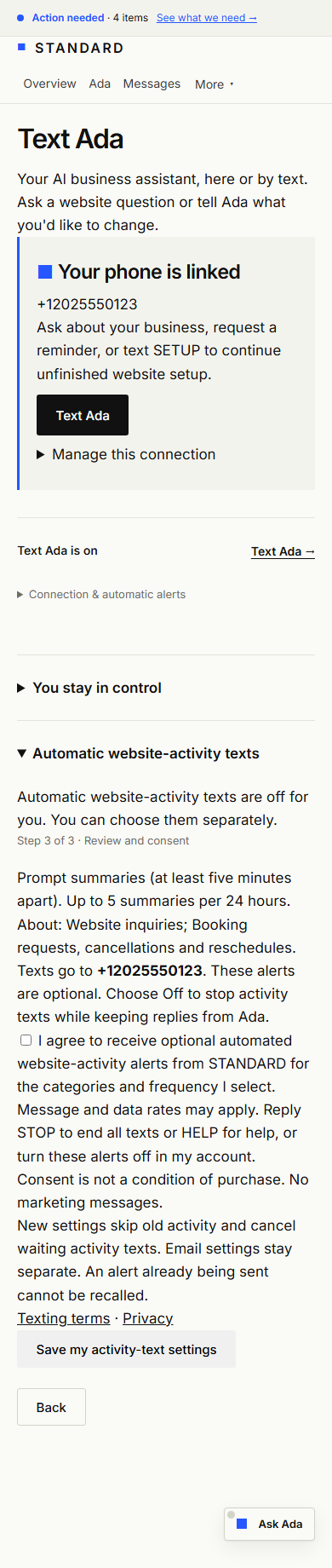
Automatic activity texts are not activated. The following describes the separate opt-in prepared for provider review. Existing customer-support texting is unaffected.
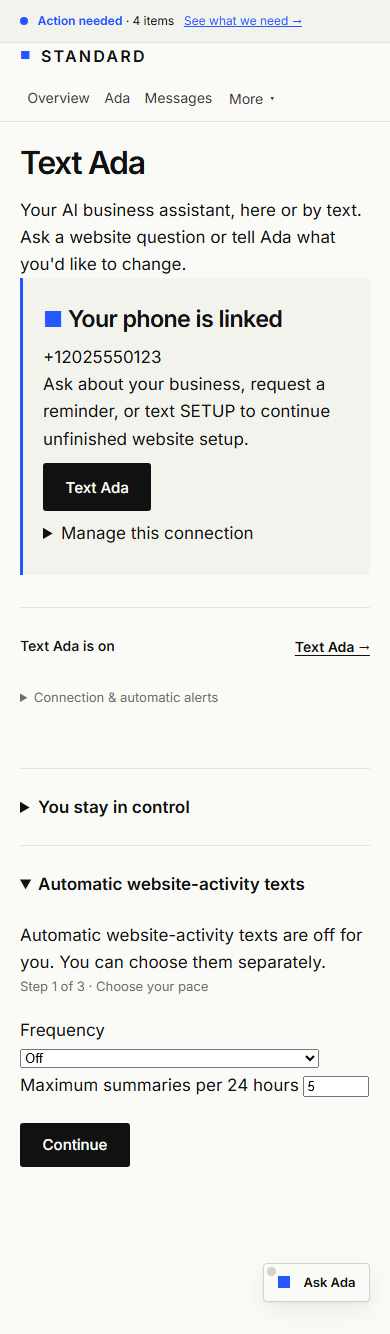
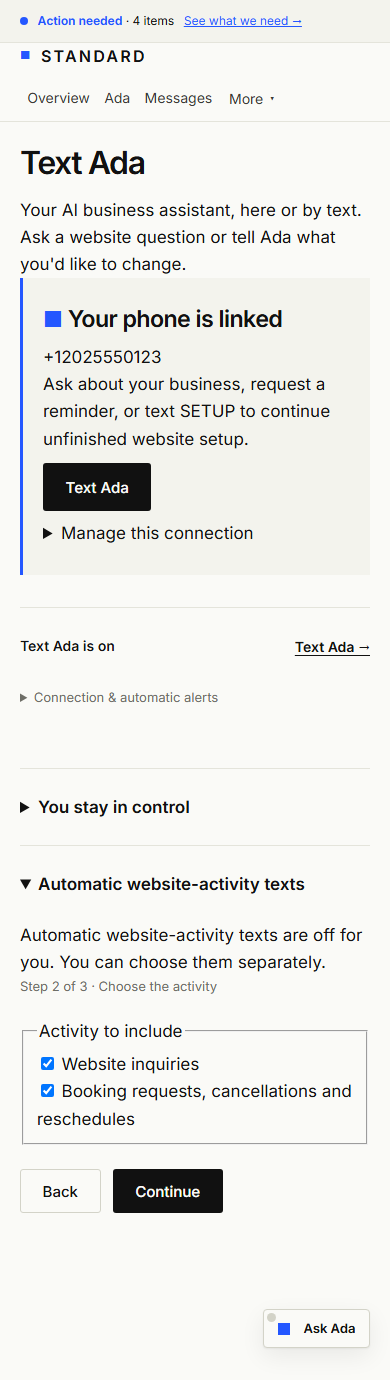
Once available, a signed-in account member with inbox access and a linked phone can separately choose alerts for website inquiries and booking activity, including cancellations and reschedules. Choose prompt, hourly or daily summaries and a maximum number per 24 hours. Alerts contain an activity summary and a private account link; visitor details stay behind sign-in. No order feed is currently connected.
Turning activity alerts off keeps replies from Ada available. STOP ends all texts. Changing these preferences skips old activity and cancels pending activity texts. Requested reminders have their own explicit task, time and delivery confirmation.
Activity opt-in screens for provider review
Actual screens from an isolated example account with activity alerts enabled only for testing. The phone is fictional and no messages were sent. These screenshots do not establish provider approval.
Requested sign-in codes
Phone sign-in is being prepared and is not activated.
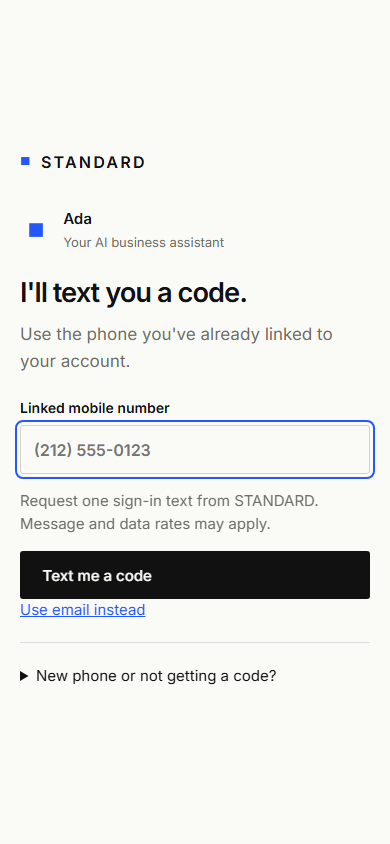
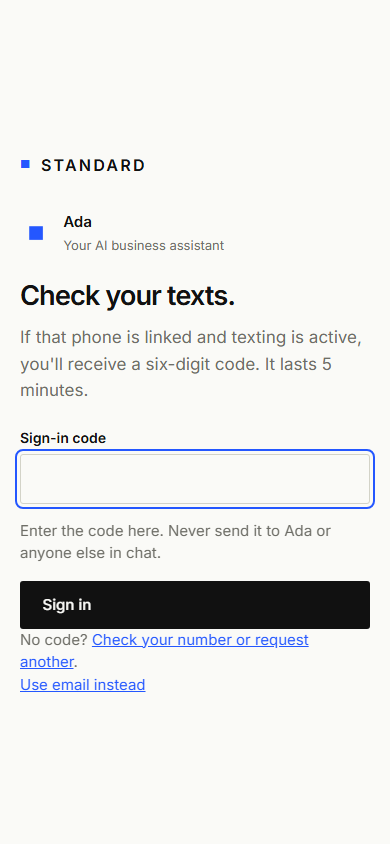
When available, choose “Text me a code” on the sign-in page using a phone already linked to your account. That action requests one sign-in text; it does not subscribe you to activity alerts or marketing. Codes expire in five minutes and work once in the browser that requested them. Message and data rates may apply. Email sign-in remains available. Never send a code to Ada or anyone else in chat.
Sign-in screens for provider review
Isolated example screens; no real codes or customer information. Phone sign-in remains subject to provider approval.
Optional requested-preview texts
Requested website previews and related sales questions use a separate number, +18339250012. Existing customer-support texting stays on the number linked in your account. Consent and STOP requests apply to the number you text.
Prospect preview texting is being prepared for provider review and is not activated. Existing customer-support texting is unaffected.
If you request a private website preview by phone, Ada can offer to send the upload and preview links by text. She asks whether the number you called from is your mobile, reads the separate texting disclosure and logs your answer in the call transcript. Test calls may also have an audio recording when the caller separately agrees to that. Agreeing to build a preview alone does not authorize texts. This call-based option is pending carrier review; Ada will not offer it until approved and activated.
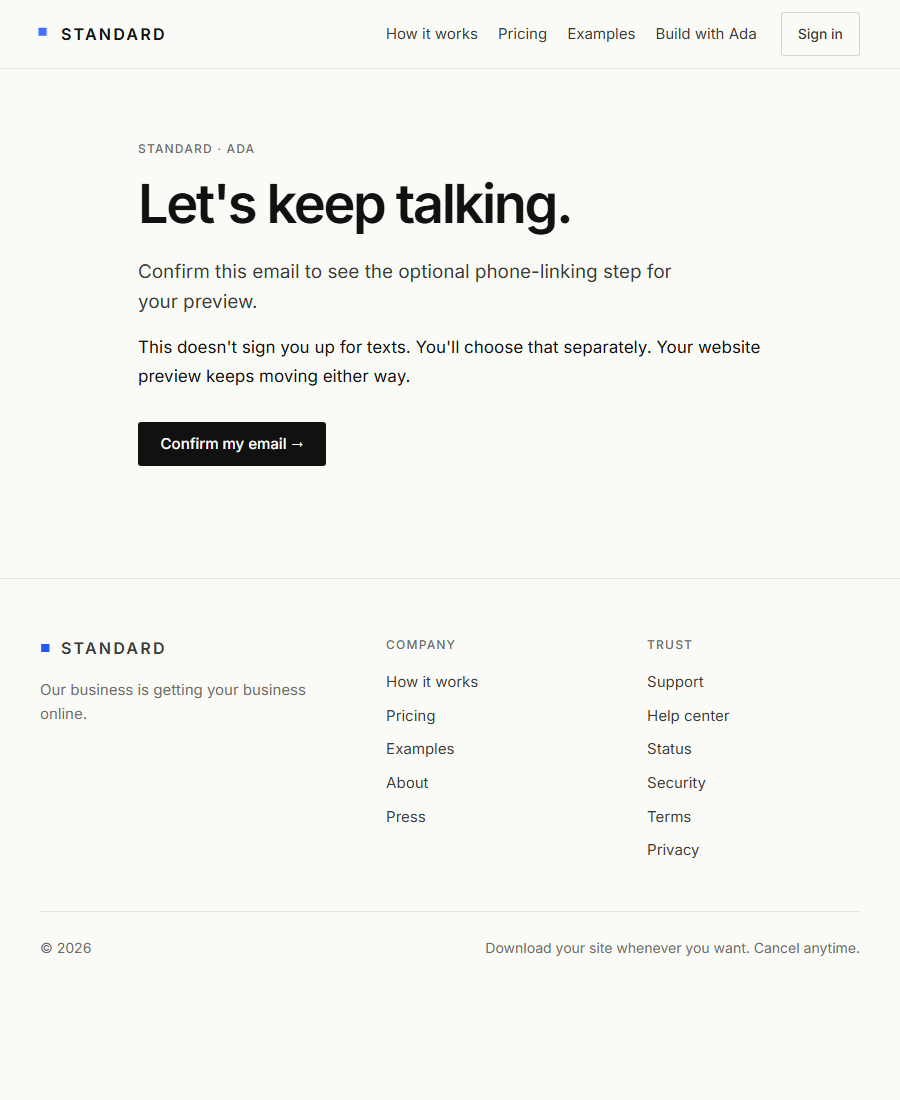
If you request a preview on the website or choose email on a call, you can separately opt in from the emailed request: confirm the email, choose the unchecked consent box, then send the one-time PREVIEW code from your phone. This links the preview conversation; it does not sign you into an account.
Messages include your requested preview link and replies about the offer, your questions and next steps. Frequency varies; message and data rates may apply. No purchased lists or unsolicited text campaigns are included. The preview conversation expires after seven days; request a new preview and opt in again to restart it. Texting is optional and is not a condition of purchase; you can use email and the website instead.
If you later become a customer, you can link your phone to your account to keep talking with Ada on that same number. The account link verifies your access before Ada discusses private messages or website requests. Preview consent by itself does not grant account access. This same-number handoff is pending separate provider approval.
STOP ends preview texts and cancels queued messages. A message already being sent may still arrive. HELP provides support information. START clears a carrier block but does not reconnect the preview; return to your request page and give fresh consent. A text cannot approve payment or publication. Carrier delivery is not guaranteed.
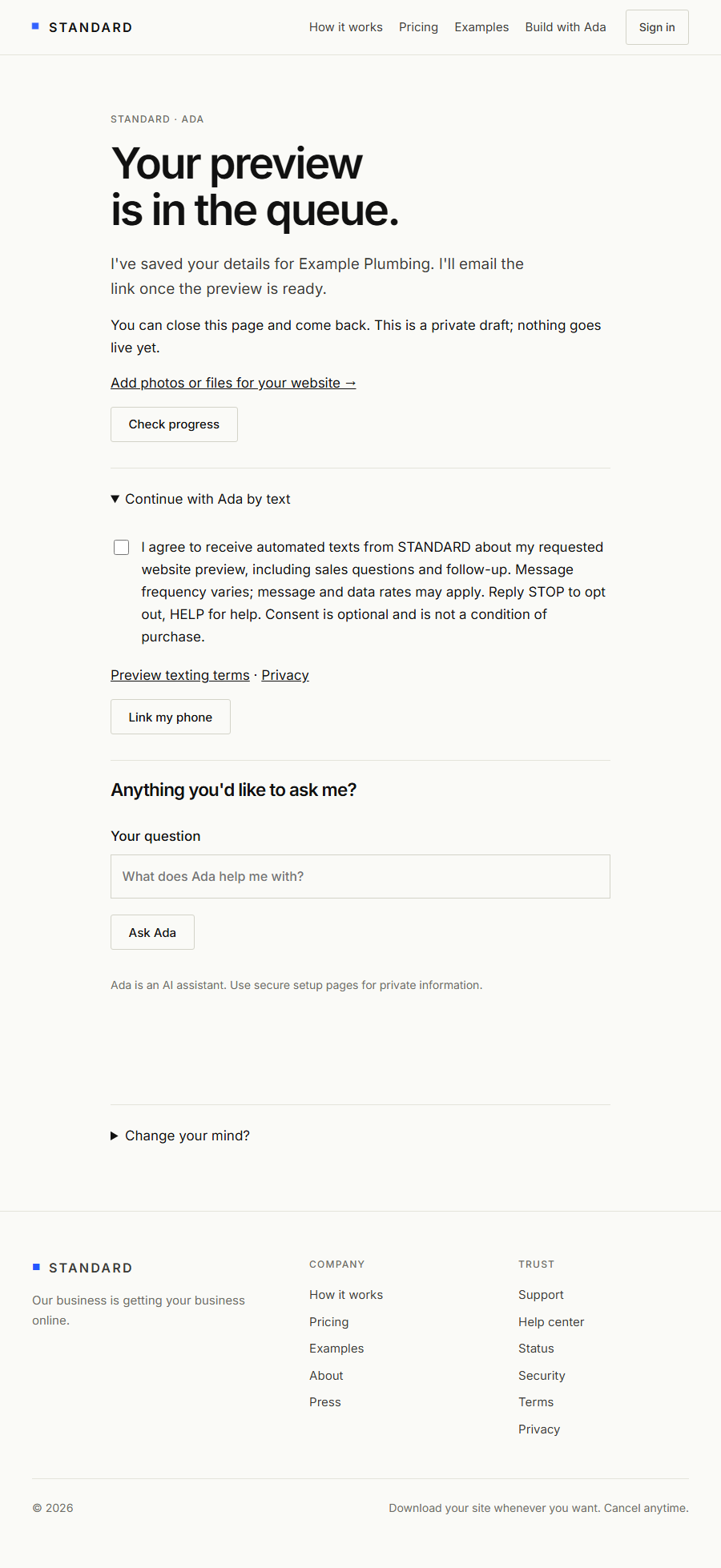
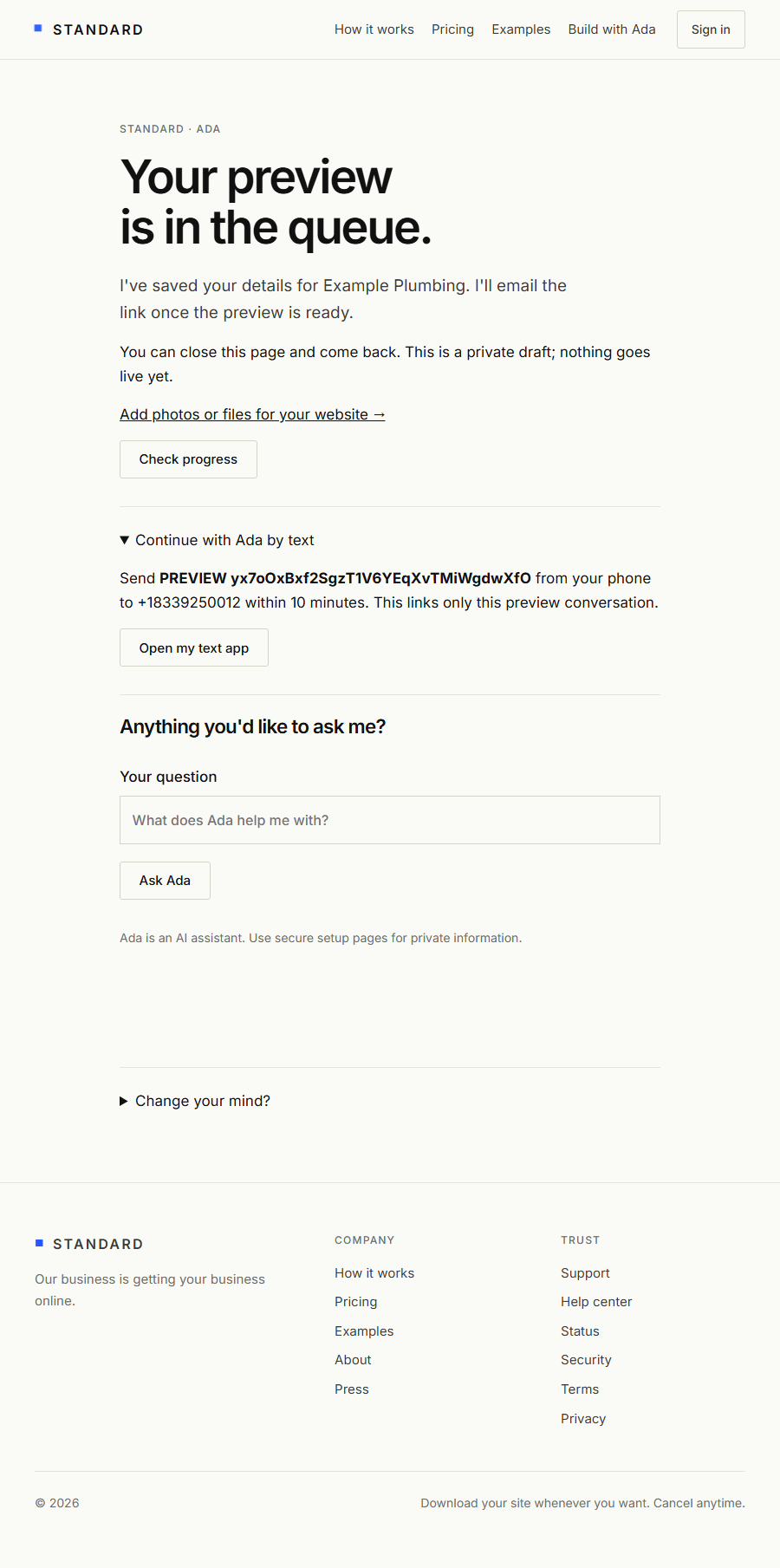
Preview opt-in screens for provider review
These are actual screens from an isolated example request with preview texting enabled only for capture. No real customer data or messages are used; the displayed code was revoked. Screenshots are evidence of the proposed process, not provider approval.
Confirm the emailed link · Optional unchecked consent · Prove phone control
Stop, help, and reconnecting
Reply STOP to opt out or disconnect your phone inside your account. Pending replies are canceled; a message already being sent cannot be recalled. HELP requests carrier-provided assistance; for account support, contact us here. After opting out, send START to clear the carrier block, then sign in and link your phone again. START alone does not restore access to an account.
Phone privacy
For phone sign-in, we keep keyed hashes of the requested number, requesting IP, browser challenge and code, plus expiration, attempt count and account binding. Codes are not stored in support conversations or passed to the assistant model.
We record your phone number, consent wording and time, phone-verification time, incoming support messages, and sending status. These records connect your requests to the correct account and help us investigate delivery problems. We use Twilio to process texts; our existing assistant providers process support questions as described in our privacy policy.
Mobile opt-in data and consent are not sold or shared with third parties or affiliates for marketing or promotional purposes. Service providers may process them only to deliver and support this service. Do not send passwords, payment details, or sensitive customer records by SMS. Contact support if your number changes.
These texting terms supplement our service terms and privacy policy. Your account and email support remain available without SMS consent.